Adding code templates/shortcuts in AX 2012
Adding code templates/shortcuts in AX 2012
19032012
If you’ve got any blocks of code that you use frequently, e.g. specific comment blocks, you can very easily add code short cuts in AX 2012 to auto-insert the them in to your X++ code.
For example you can setup AX to automatically create surrounding comment such as
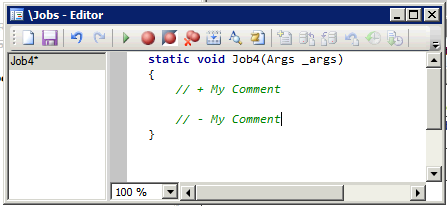
whenever you type “mycom” and press the tab key.
How do you accomplish this. Very easily!
Step1: Locate the class EditorScripts in the AOT.
Step2: Create a new method with the format public void template_flow_[shortcut](Editor editor)Step3: User the editor parameter to add code the code that you would like inserted. e.g. editor.insertLines(“\\test comment”);
Step4: Add your method to the case statement in the isApplicableMethod method in the section relating to template “editor scripts that does not apply to Macros”
Step2: Create a new method with the format public void template_flow_[shortcut](Editor editor)Step3: User the editor parameter to add code the code that you would like inserted. e.g. editor.insertLines(“\\test comment”);
Step4: Add your method to the case statement in the isApplicableMethod method in the section relating to template “editor scripts that does not apply to Macros”
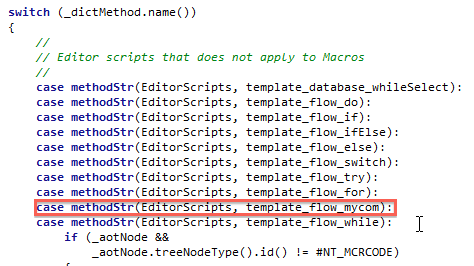
Thats it, now if you type your shortcut into any editor in AX and press tab, the “\\test comment” code will be inserted.
Here’s a full example method
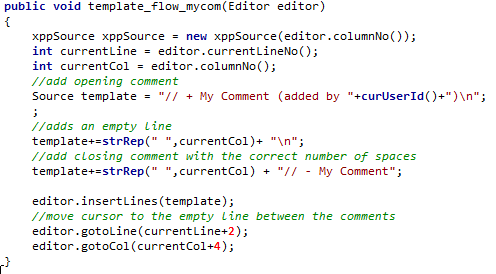
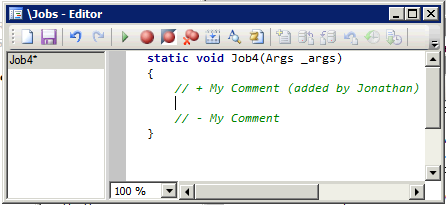
The above creates the following output:

Comments
Post a Comment